

Firmware updates are supposed to improve your device — not break it.
Yet in recent years, more Australians have been walking into repair shops with phones, laptops, tablets, and smart devices that suddenly stopped working after a routine update.
At Smart Electronix, we’ve seen a significant rise in repair cases directly linked to faulty updates, incomplete installations, and corrupted firmware. While updates are crucial for security and performance, they can also introduce serious issues if something goes wrong in the process.
This blog breaks down why firmware updates are causing more repair cases, what consumers should watch out for, and how our technicians safely restore devices when updates fail.
⚙️ 1️⃣ What Exactly Is Firmware — and Why Does It Matter?
Firmware is the low-level code that controls your device’s hardware.
Unlike apps or operating systems, firmware tells your device’s components how to work:
-
How your battery charges
-
How your touchscreen responds
-
How your camera focuses
-
How your wireless antennas connect
-
How your processor manages performance
When firmware gets corrupted, outdated, or improperly installed, your device may not function properly — or may not power on at all.
Updates should improve stability, but one small glitch can cause major damage.
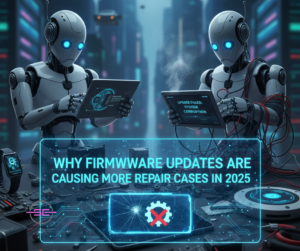
🧨 2️⃣ Why Firmware Updates Are Causing More Repair Cases in 2025
📌 Reason 1: Devices Are Becoming More Complex
Modern phones and laptops rely on multiple interconnected firmware layers:
-
Battery management firmware
-
Display firmware
-
Camera module firmware
-
Motherboard firmware
-
Security firmware
-
5G/WiFi/Bluetooth module firmware
If one layer fails during an update, the whole device can malfunction.
📌 Reason 2: Updates Are Bigger and More Frequent
Manufacturers push out constant patches for:
-
Security vulnerabilities
-
AI model improvements
-
Battery optimization
-
Compatibility with new apps
-
Hardware calibration
Larger updates = Higher risk of failure.
📌 Reason 3: Bad Battery Health During Update
If a device shuts off mid-update due to:
-
Low battery
-
Sudden power loss
-
Faulty charging port
The firmware installation can get interrupted — leading to boot loops, bricking, or system corruption.
📌 Reason 4: Global Chip and Model Fragmentation
Different device batches use slightly different:
-
Chipsets
-
Modems
-
Power circuits
-
Display drivers
A firmware update optimized for one batch may conflict with another.
At Smart Electronix, we’ve seen phones that worked perfectly until the latest patch pushed firmware not suitable for their exact hardware revision.
📌 Reason 5: Wireless Updates Are Less Stable
Most updates happen via WiFi or mobile data.
If the connection drops or packets corrupt during installation, the device may fail to boot.
This is one of the most common causes of smartphone repair cases today.
🔥 3️⃣ Common Firmware-Related Problems We See at Smart Electronix
🛑 Boot Loops
Device turns on → logo appears → shuts off → restarts.
This cycle continues endlessly due to firmware corruption.
📴 Complete Bricking
The device:
-
won’t turn on
-
won’t charge
-
won’t enter recovery mode
This is the most severe result of a failed update.
📲 Touchscreen Malfunction
Firmware updates affecting display drivers can cause:
-
ghost touches
-
dead zones
-
inaccurate taps
📶 Signal Loss / Network Failure
Updated modem firmware may conflict with:
-
4G/5G bands
-
carrier settings
-
WiFi encryption
-
Bluetooth drivers
These issues usually surface immediately after an update.
🔋 Battery Drain or Overheating
Faulty power-management firmware can make your device:
-
drain battery faster
-
overheat during normal use
-
shut down unexpectedly
🎥 Camera Failure
Images may appear:
-
blurry
-
dark
-
frozen
-
stuck on a black screen
This often happens when camera calibration firmware fails.
🧰 4️⃣ How Smart Electronix Repairs Firmware-Related Problems
Firmware repairs require precision, expertise, and the right tools — not simple resets.
Here’s how we handle them:
🔧 Step 1: Deep Diagnostic Scan
We use professional-grade tools to:
-
read firmware status
-
detect corruption
-
identify module conflicts
-
inspect power cycles
-
analyze boot logs
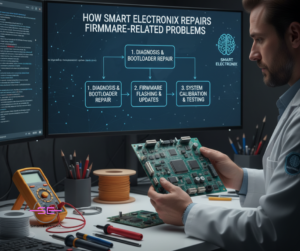
🔧 Step 2: Safe Firmware Reinstallation
We re-flash:
-
system firmware
-
modem firmware
-
bootloader
-
display driver firmware
-
battery management firmware
Using secure, risk-free methods.
🔧 Step 3: Chip-Level Evaluation (if needed)
If the update damaged memory chips or controllers, we repair:
-
eMMC / UFS chips
-
power ICs
-
PMIC controllers
-
charging circuits
Our technicians are trained in micro-soldering and chip-level restoration — something most repair shops don’t offer.
🔧 Step 4: Data Protection & Recovery
Whenever possible, we protect:
-
photos
-
videos
-
contacts
-
conversations
-
documents
We understand how valuable your data is.
🔧 Step 5: Update Prevention & Stability Checks
After repair, we ensure:
-
the device is fully stable
-
all modules work
-
the latest SAFE firmware is installed
We also advise customers on how to avoid future firmware issues.
⚠️ 5️⃣ What Users Should Watch Out For Before Updating
Avoid firmware headaches by following these simple precautions:
💡 1. Charge your device above 50% (preferably 80%)
Low battery is one of the top causes of update failure.
💡 2. Use a stable WiFi connection
Avoid updating on mobile data.
💡 3. Don’t interrupt the update
Don’t press buttons, restart, or remove the battery.
💡 4. Avoid early updates
Wait 2–3 days and check online reviews — early updates often carry bugs.
💡 5. Free up storage
Firmware updates need space to install safely.
💡 6. Check compatibility
Older devices may struggle with heavy updates.
💡 7. Disable auto-updates
This prevents updates installing at inconvenient times.
🌟 6️⃣ Why Smart Electronix Is the Best Place for Firmware Repairs
We specialize in:
-
Firmware corruption recovery
-
Boot loop fixes
-
Complete device unbricking
-
Secure flashing and updating
-
Chip-level repair
-
Data protection during repair
-
Multi-brand firmware diagnostics
With advanced tools and expert technicians, Smart Electronix handles what most repair shops can’t.
🧩 Final Thoughts
Firmware updates are essential — but they’re also becoming one of the leading causes of repair cases worldwide.
With increasing device complexity, larger updates, and more firmware layers than ever, even a small glitch can cause major failures.
The good news?
Smart Electronix is equipped to fix them all.
Whether your device is stuck in a boot loop, bricked, overheating, or malfunctioning after an update, our team can restore it safely, quickly, and professionally.