
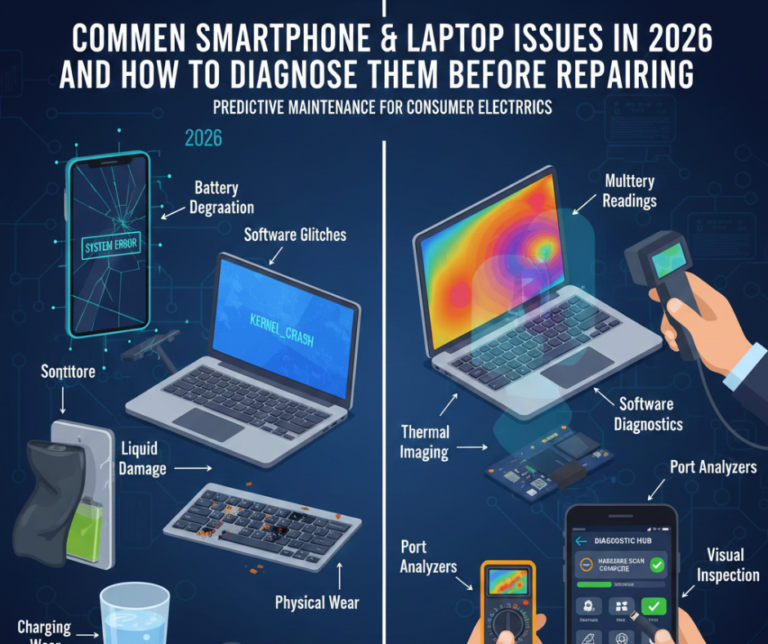
In 2026, smartphones and laptops are more advanced than ever — powered by AI-driven software, faster processors, foldable displays, and always-on connectivity. While these innovations improve performance, they also introduce new types of problems that aren’t always obvious at first glance.
Many users assume their device is “dead” or outdated when, in reality, the issue may be minor, fixable, or software-related. At Smart Electronix, we often see customers spending money unnecessarily simply because a problem wasn’t properly diagnosed first.
This guide explains the most common smartphone and laptop issues in 2026 and shows how to identify the real cause before jumping into repairs or replacements.
Why Diagnosis Comes Before Repair in 2026
Modern devices are tightly integrated systems. A single symptom—such as slow speed or overheating—can stem from:
-
Software conflicts
-
Firmware updates
-
Battery degradation
-
Thermal issues
-
Hardware wear
Replacing parts without diagnosis can:
-
Increase costs
-
Cause repeat failures
-
Risk data loss
-
Shorten device lifespan
A correct diagnosis saves both time and money.
Common Smartphone Issues in 2026
1. Fast Battery Drain & Sudden Shutdowns
What users notice:
-
Battery drops quickly
-
Phone shuts down even above 20%
-
Heats up during light use
Likely causes:
-
Aging battery cells
-
AI background processes
-
Poor firmware optimisation
-
Non-certified chargers
How to diagnose before repair:
-
Check battery health in system settings
-
Review background app usage
-
Test with an original charger
-
Observe drain during standby vs active use
In most cases, a battery replacement or software optimisation solves the issue.
2. Device Overheating
What users notice:
-
Phone becomes hot while idle
-
Performance slows down
-
Thermal warning messages
Likely causes:
-
Dust or trapped heat
-
Thermal pad degradation
-
Heavy background apps
-
Faulty firmware updates
Basic diagnosis:
-
Restart in safe mode
-
Remove phone case temporarily
-
Monitor temperature during charging vs usage
Persistent overheating often requires internal thermal servicing.
3. Touchscreen & Display Problems
What users notice:
-
Touch not responding in certain areas
-
Random taps or scrolling
-
Screen flicker or brightness issues
Likely causes:
-
Impact damage
-
Moisture exposure
-
Display connector wear
-
Software glitches
How to diagnose:
-
Take a screenshot (if issue doesn’t appear, hardware is likely)
-
Test in safe mode
-
Check for cracks or pressure spots
4. Charging & Port Issues
What users notice:
-
Charging only works at an angle
-
Slow charging
-
No charging symbol
Likely causes:
-
Lint or debris in port
-
Cable damage
-
Port corrosion
Diagnosis steps:
-
Try multiple cables and adapters
-
Inspect port with a light
-
Test wireless charging if available
Many “dead” phones simply need professional port cleaning or replacement.
5. Camera, Face ID & Sensor Failures
What users notice:
-
Camera app crashes
-
Blurry or foggy photos
-
Face unlock not working
Likely causes:
-
Firmware conflicts
-
Moisture damage
-
Faulty camera module
How to diagnose:
-
Test camera in third-party apps
-
Run built-in diagnostics
-
Look for condensation under the lens
Common Laptop Issues in 2026
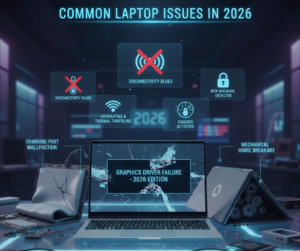
1. Slow Boot & Poor Performance
What users notice:
-
Laptop takes long to start
-
Apps freeze or lag
-
Frequent stuttering
Likely causes:
-
Failing SSD
-
Too many startup apps
-
Thermal throttling
-
Firmware bloat
Diagnosis steps:
-
Check storage health
-
Monitor CPU usage and temperatures
-
Disable unnecessary startup programs
Often fixed with SSD replacement, cleanup, or thermal service.
2. Overheating & Loud Fans
What users notice:
-
Fans running constantly
-
Hot keyboard or palm rest
-
Sudden shutdowns
Likely causes:
-
Dust-blocked vents
-
Dried thermal paste
-
Faulty cooling fan
How to diagnose:
-
Monitor temperatures under load
-
Listen for grinding or rattling fan noise
-
Inspect vents for dust buildup
3. Laptop Battery Problems
What users notice:
-
Battery drains quickly
-
Laptop shuts down unplugged
-
Battery percentage jumps
Likely causes:
-
Battery wear
-
Firmware miscalibration
-
Power controller issues
Diagnosis steps:
-
Generate battery health report
-
Test performance plugged vs unplugged
-
Check BIOS battery data
4. Wi-Fi & Bluetooth Instability
What users notice:
-
Slow internet despite fast network
-
Frequent disconnections
-
Bluetooth devices dropping out
Likely causes:
-
Driver conflicts
-
Antenna cable damage
-
Firmware updates
How to diagnose:
-
Test on different networks
-
Update network drivers
-
Use external USB Wi-Fi adapter as comparison
5. Keyboard & Trackpad Malfunctions
What users notice:
-
Keys not responding
-
Random cursor movement
-
Trackpad clicks not working
Likely causes:
-
Liquid residue
-
Worn ribbon cables
-
Firmware conflicts
Diagnosis steps:
-
Use external keyboard/mouse
-
Test input in BIOS
-
Inspect for liquid exposure
Red Flags That Need Immediate Professional Help
Seek expert repair if you notice:
-
Battery swelling
-
Burning smell
-
Corrosion
-
Repeated boot loops
-
No power response
Delaying repair can cause permanent motherboard damage.
Why DIY Diagnosis Has Limits
While basic checks are helpful, modern devices require:
-
Manufacturer diagnostic tools
-
Firmware integrity testing
-
Power rail analysis
-
Thermal profiling
Incorrect DIY attempts often turn simple repairs into expensive ones.
How Smart Electronix Diagnoses Devices in 2026
At Smart Electronix, diagnostics are structured and transparent:
✔ Full hardware & software assessment
✔ Battery and thermal health checks
✔ Firmware and update analysis
✔ Clear repair vs replace recommendations
✔ No unnecessary part replacement
We fix the root cause, not just the symptom.
Final Thoughts
In 2026, device issues are more complex—but also more solvable than ever. Before assuming your smartphone or laptop is beyond repair, take time to diagnose the problem properly.
Early diagnosis prevents data loss, reduces costs, and extends device lifespan.
Smart Electronix is committed to helping Australians diagnose smartly, repair responsibly, and get the most value from their technology.